One
of the easiest ways to block unwanted sites for your young children is
to filter it via DNS. You can set the DNS in your router, therefore
automatically filter all unwanted content such as adult websites,
gambling sites, block onlyfans, disable ads and tracking. Fortunately,
there are many free Public DNS available for the public, some are made
for performance such as Google DNS and Cloudflare, while others are made
for parents to filter the web.
Related Article 😍💰👉 5 Free DNS Parental Control For XBox, PlayStation, iPhone, iPad And More
With so many free DNS to choose from, an Automatic DNS Changer
enables you to switch between various DNS based on which is the
fastest. Below is a complete list of free DNS servers you can use
instead of the ones assigned to you by default by your ISP, the best and
most reliable will probably be Google and Cloudflare.
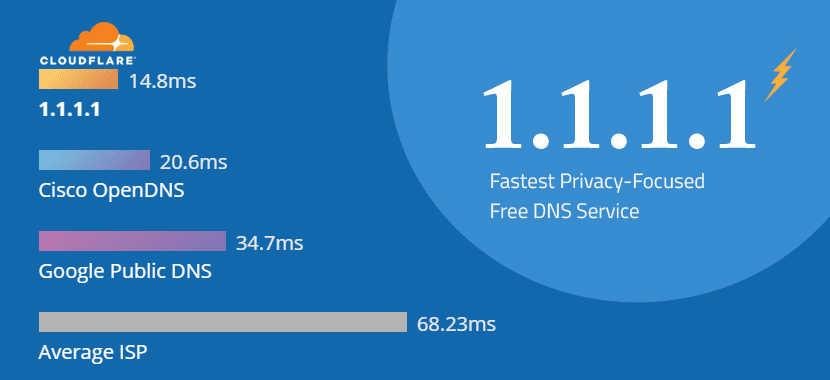
The fastest DNS resolvers on earth
Your
Internet service provider can see every site and app you use—even if
they’re encrypted. Some providers even sell this data, or use it to
target you with ads. 1.1.1.1 is a partnership between Cloudflare and
APNIC. Cloudflare runs one of the world’s largest, fastest networks.
APNIC is a non-profit organization managing IP address allocation for
the Asia Pacific and Oceania regions. Best DNS for XBox. For IPv6:
2606:4700:4700::1111 and 2606:4700:4700::1001
- Primary: 1.1.1.1
- Secondary: 1.0.0.1
Malware blocking only
- Primary: 1.1.1.2
- Secondary: 1.0.0.2
3. Cloudflare [ Security + Family Safe ]
Malware and adult content blocking
- Primary: 1.1.1.3
- Secondary: 1.0.0.3
Reliable, resilient, low-latency DNS serving from Google’s worldwide network
Google
Public DNS is a free, global DNS resolution service that you can use as
an alternative to your current DNS provider. Why should you try Google
Public DNS? You get a faster browsing experience with improved security
and get the results you expect with absolutely no redirection. Google
also offers IPv6 public DNS servers: 2001:4860:4860::8888 and
2001:4860:4860::8844.
- Primary: 8.8.8.8
- Secondary: 8.8.4.4
5. Quad9 [ Privacy + Security ]
A public and free DNS service for a better security and privacy
Quad9
routes your DNS queries through a secure network of servers around the
globe. The system uses threat intelligence from more than a dozen of the
industry’s leading cyber security companies to give a real-time
perspective on what websites are safe and what sites are known to
include malware or other threats. No personal data is stored. Quad9 also
has a secure IPv6 DNS server at 2620:fe::fe.
- Primary: 9.9.9.9
- Secondary: 149.112.112.112
6. DNS Watch [ Performance ]
No Censorship with speed
DNS
Watch is optimized for maximum speed – you will not feel any delays
when browsing the web. They believe that everyone should have access to
an uncensored resolver free of charge. They have no interest in logging
DNS queries. That’s why all their resolvers are setup to not log any
queries. DNS.WATCH also has IPv6 DNS servers at
2001:1608:10:25::1c04:b12f and 2001:1608:10:25::9249:d69b.
- Primary: 84.200.69.80
- Secondary: 84.200.70.40
Web Access Control, Protective DNS, and Visibility
Comodo
Secure DNS is a domain name resolution service that resolves your DNS
requests through their worldwide network of redundant DNS servers. This
can provide a much faster and more reliable Internet browsing experience
than using the DNS servers provided by your ISP and does not require
any hardware or software installation.
Secure
DNS 2.0’s new dashboard, available to beta users, makes it simple to
set content filters at a network level to help prevent unwanted content
from being accessed in your home or network. To enable, simply add your
network and set the categories of domains you wish to block. Customize
your preferences from more than 25 categories, including proxy and
anonymizer blocking.
- Primary: 8.26.56.26
- Secondary: 8.20.247.20
Free service with customizable filtering and basic protection
OpenDNS
Home enables websites to load faster, and with OpenDNS’ 100% up-time,
you won’t have to worry about unreachable websites and DNS outages from
your ISP. With over 50 customizable filtering categories, OpenDNS Web
content filtering keeps parents in control of what websites children
visit at home. OpenDNS also blocks phishing websites that try to steal
your identity and login information by pretending to be a legitimate
website. Surf the Web with confidence.
- Primary: 208.67.222.222
- Secondary: 208.67.220.220
Preconfigured to block adult content — set it & forget it
OpenDNS
also offers DNS servers that block adult content. FamilyShield is a
special service offered by OpenDNS distinct from their standard
packages. Meant for home users who want to keep their children from
seeing inappropriate images.
- Primary: 208.67.222.123
- Secondary: 208.67.220.123
Yandex.DNS
is a free, recursive DNS service. Yandex.DNS’ servers are located in
Russia, CIS countries, and Western Europe. Users’ requests are processed
by the nearest data center which provides high connection speeds. Your
requests are directed to Yandex DNS servers. Since we have 100+ DNS
servers, websites load quickly. Their DNS servers are always* available.
And your data is safe and secure.
- Primary: 77.88.8.8
- Secondary: 77.88.8.1
Protection from fraudulent and harmful websites
Websites
with malicious code can steal your data (for example, your phone number
or card details) or trick you into signing up for a paid newsletter.
Yandex DNS blocks them. Bots can steal your data or mine cryptocurrency
on your computer. Yandex blocks botnets, which are computer networks
infected with bots, by interrupting their communication with the server
controlling them. We receive data from our partners.
- Primary: 77.88.8.88
- Secondary: 77.88.8.2
Block adult websites and harmful search queries
Yandex
algorithms recognize erotic and pornographic content. If you try to
open a website with content like that, you will be shown a special page
without it. Yandex recognizes advertising networks with erotic and
pornographic ads and keeps them from getting actual IP address. Banners
like that are blocked on all sites you visit. Adult content is removed
from search results. Even if you enter an explicit query like “porn”,
erotic and pornographic content is not displayed in search results.
- Primary: 77.88.8.7
- Secondary: 77.88.8.3
Mitigates threats by preventing access to malicious websites known for malware and phishing
Security,
reliability, performance. Just what you want in your DNS. They’re the
reasons Fortune 500 and Alexa 100 companies count on us to secure this
cornerstone of their connected world. The fourth DNS is Family Secure
which uses Threat Protection plus it also blocks pornography, some
gambling sites, violence and hate.
- Primary: 156.154.70.3
- Secondary: 156.154.71.3
14. AdGuard DNS [ Security + Ad Blocking DNS ]
Will block ads and trackers.
- Primary: 94.140.14.14
- Secondary: 94.140.15.15
Will not block ads, trackers, or any other DNS requests.
- Primary: 94.140.14.140
- Secondary: 94.140.14.141
Will block ads, trackers, adult content, and enable Safe Search and Safe Mode, where possible.
- Primary: 94.140.14.15
- Secondary: 94.140.15.16
DNS
for Family is created with the intention of providing safe and clean
internet to users all around the world. As you might be aware that today
the internet is an open ended place, anybody can create websites, do
some publishing and bring users to their websites. Make your browsing
family friendly. Protect your family from unwanted websites.
DNS
for Family provides free DNS servers that filter websites for family
use, and enforce safe search in Google, YouTube, Bing, DuckDuckGo and
Yandex. Our servers are DNSSEC ready, non-logging, and also support
DNS-over-TLS, DNS-over-HTTPS, DNSCrypt v2 and IPv6. These servers
primarily block porn and other adult websites, while also providing
protection from malware and blocking ads, meanwhile the blacklist is
updated daily, automatically!
- Primary: 94.130.180.225
- Secondary: 78.47.64.161
Easily
install Internet Guide within your router to provide the same safe and
fast experience on all devices connected to your network or use our
Update Client to configure Internet Guide on a local Windows, Linux or
macOS computer. Simply install our Update Client to monitor your device,
and your hostname will update whenever its IP address changes.
- Primary: 216.146.35.35
- Secondary: 216.146.36.36
Gcore
Public DNS resolver is one of the fastest in Europe (9.36 ms,) South
America (5.44 ms,) and Africa (11.32 ms.) It works over our global edge
network (180+ PoPs worldwide) and delivers users the best-to-date
browsing experience. They anonymize Gcore DNS query logs, store them
carefully in the Luxembourg Tier IV data center (under EU law,) and
never transfer them to third parties. Using Anycast network with 180+
nodes worldwide makes our DNS service resistant to even the largest DDoS
attacks.
- Primary: 95.85.95.85
- Secondary: 2.56.220.2
20. Control D [ Security + Ad Blocking DNS ]
Control
D uses Anycast Network, it is engineered for minimal latency and
high-speed performance, delivering an efficient browsing experience.
Supports advanced DNS encryption protocols, including DNS over HTTPS
(DoH) and DNS over TLS (DoT).
- Primary: 76.76.2.2
- Secondary: 76.76.10.2
Free
and Public DNS Servers From Control D. Block Ads, Malware, and Stay
Safe Online. Don’t stress about browser tracking — Control D doesn’t
store any DNS queries. Engineered for minimal latency and high-speed
performance, delivering an efficient browsing experience.
- Primary: 76.76.2.4
- Secondary: 76.76.10.4
[
Not Free Anymore ] CleanBrowsing offers a safe way to browse the web
without surprises. Their free family filter, for example, blocks adult
content, while still allowing Google, Youtube, Bing, DuckDuckGo and the
rest of the web to load safely. All it takes is 5 minutes to enable the
service for free and nothing to install.
Just pick the devices
your kids will use and change the DNS server on them to point to
185.228.168.168 (or 185.228.169.168). You can also change the DNS server
on your router to cover your whole house. It really just takes 5
minutes.
- Primary: 185.228.168.168
- Secondary: 185.228.169.168
[
Not Free Anymore ] How much time are your children spending online?
What exactly are your children looking at online, and who’s targeting
content at them? How can you easily block unwanted and inappropriate
content? Safe Surfer protects over 300,000 Android and Apple mobile
devices, tablets, home PC’s, TV’s and Laptops every day, providing peace
of mind and safety to families and businesses around the world.
- Primary: 104.197.28.121
- Secondary: 104.155.237.225
24. UncensoredDNS [ Bypass Censor ]
[
Discontinued ] UncensoredDNS is the name of a DNS service which
consists of two uncensored DNS servers. The servers are available for
use by anyone, free of charge. The 91.239.100.100 address is anycast
from multiple locations while the 89.233.43.71 one is physically located
in Copenhagen, Denmark. 2001:67c:28a4:: 2a01:3a0:53:53::
- Primary: 91.239.100.100
- Secondary: 89.233.43.71
25. Fourth Estate [ No Log ]
[
Discontinued ] As part of their public-benefit mission, they provide
free, uncensored Domain Name System (DNS) service to internet users
around the world. These public DNS servers are maintained and operated
by the Fourth Estate. They don’t monitor, record or store logs for any
single user’s activity and they don’t alter, redirect or censor DNS
records.
- Primary: 45.77.165.194
- Secondary: 45.32.36.36
26. Verisign [ Privacy ]
[
Discontinued ] Verisign Public DNS is a free DNS service that offers
improved DNS stability and security over other alternatives. And, unlike
many of the other DNS services out there, Verisign respects your
privacy. They will not sell your public DNS data to third parties nor
redirect your queries to serve you any ads. Verisign offers IPv6 public
DNS servers as well: 2620:74:1b::1:1 and 2620:74:1c::2:2.
- Primary: 64.6.64.6
- Secondary: 64.6.65.6
27. Norton ConnectSafe [ Family ]
[
Discontinued ] Norton ConnectSafe is a cloud-based Web filtering
service that helps protect you from accessing malicious sites and sites
with unwanted or offensive content, based on filtering policies you
select. When using Norton ConnectSafe, you get these IP addresses
quickly, plus Norton ConnectSafe performs a quick check on each site to
make sure that the requested Web site is safe.
If the requested
Web site is unsafe, you will see a warning that includes information on
why they rated the site as dangerous. For blocking malware only, use
199.85.126.30 and 199.85.127.30
- Primary: 199.85.126.30
- Secondary: 199.85.127.30
28. Free Recursive DNS [ Family ]
[
Discontinued ] Provided free of charge, Free Recursive DNS enables
users, families, and small businesses to experience a much more
reliable, faster and safer online experience. Simply change your DNS
settings and experience the Internet like never before. Family Secure
blocks most unfriendly content for kids. IPv6: 2610:a1:1018::3,
2610:a1:1019::3
- Primary: 156.154.70.1
- Secondary: 156.154.71.1
29. FreeDNS [ No Log ]
[
Discontinued ] FreeDNS is an open, free and public DNS Server. Usually
you get the DNS from your access provider and your computer resolves the
DNS via DCP automatically. But access providers sometimes implement
redirects, so if you enter a web address you don’t get the webpage you
expected. To avoid this behavior you can use an unrestricted DNS Server.
- Primary: 37.235.1.174
- Secondary: 37.235.1.177


